Flow Matching Diffusion for Drawing Circles
After working on using flow matching diffusion to teach an action head to click coordinates on a screen, I wanted to push this one step further and build a model that can draw continuously using a mouse just like a human.
To do this, I chose the QuickDraw dataset from Google since it has continuous mouse trajectories, and with some nice engineering was able to create a VLA style data format for training.
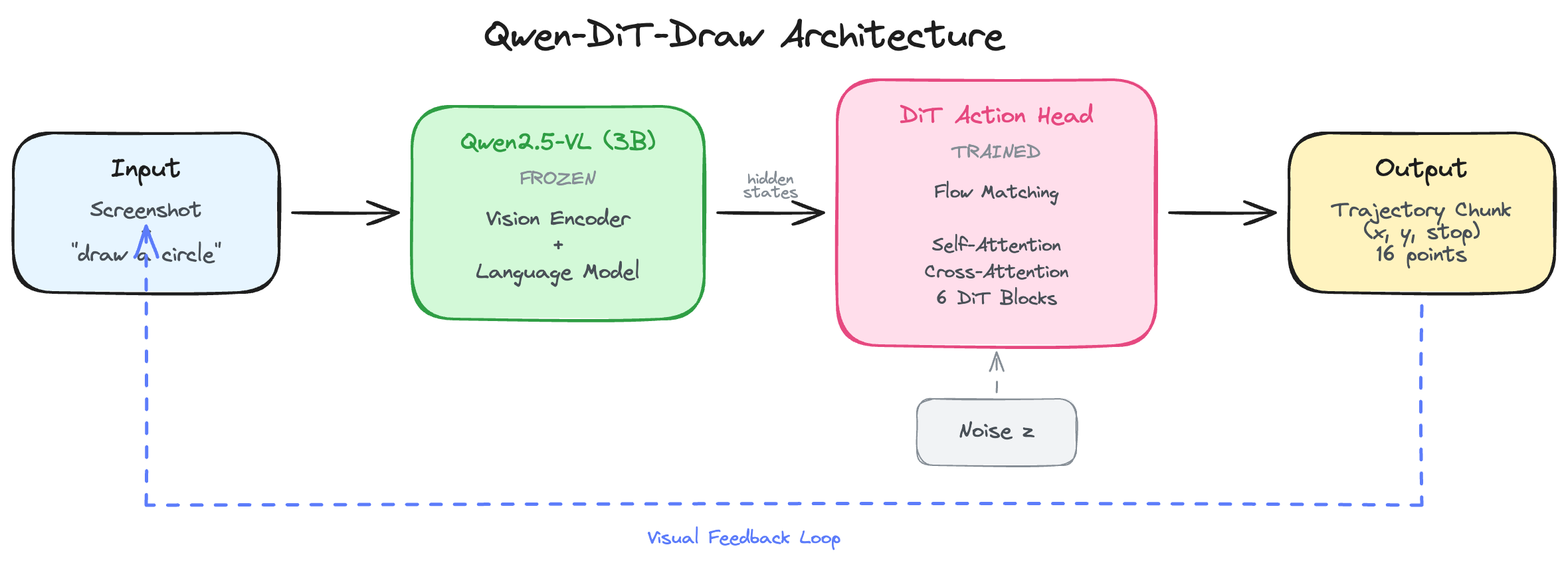
So I took the DiT click model, and changed it in a way that supports continuous trajectories via action chunking, delta mouse (x,y) coordinates and some other nice tricks (you can check the code’s readme for full description) inspired by GROOT.
I experimented with two coordinate systems: absolute (x,y) positions and delta (dx,dy) movements inspired by GR00T N1.6. Both are available as separate branches.
Something I learned is that unlike LLMs and other models, we actually need many epochs here in order to properly learn how to draw or just predict continuous trajectories even when the loss function is plateauing (cz it’s flow matching loss).
Typical LLM or VLM training runs complete at most one or two epochs… In contrast, we found it important for VLA training to iterate through the training dataset significantly more times.
- OpenVLA
OpenVLA trained for 27 epochs, GR00T uses 100 epochs for finetuning. My 3 epochs was just a proof-of-concept - the architecture works, but proper training would need 20-30+ epochs.

I only trained it for 3 epochs on 10k circles (to become like 40k samples post pre-processing) and the model was able to draw reasonable circles. Had I had unlimited compute, I would’ve just trained on the entire dataset and shapes available to see how well the model generalizes.
There’s a critical element about this approach in which the model can learn to auto-correct in real time using the trajectories and navigate environments, for example like Minecraft.
The next step will be to take the learnings from this model and come up with a unified mouse model that can click, drag, scroll, draw and do all tasks humans can do.